
Table of Contents▾
Short answer: a dealer management system (DMS) is the software a car dealership uses to run its back office: inventory, desking, deals and forms, financing, titling, accounting and reporting, all in one database. A CRM handles leads and follow-up. The DMS is where the deal gets done.
Ask five dealers what a DMS is and you will get five answers: the system tied to the factory, the program that prints contracts and tracks BHPH payments, or the spreadsheet and QuickBooks file a 40-car lot stitched together. All describe one job: one place that knows every car, every deal and every dollar.
This guide is written for independent and BHPH dealers: what a DMS does, how it differs from a CRM and a website, cloud versus on-premise, how pricing works, and how to evaluate one. The Get My Auto DMS page lists the modules; this article explains why each one exists.
Dealer Management System, Explained
A dealer management system, or DMS, is the core operating software of a car dealership. It holds the vehicle records, structures each deal, generates the contracts and DMV forms, submits deals to lenders, posts the accounting entries and reports on the results. Every department works from the same record, so the vehicle stocked in on Monday is the one desked on Friday and titled the week after, with nothing retyped.
In a car dealership the term means the back-office platform, not the marketing software. The simplest test: if it touches the money, the paperwork or the title, it belongs to the DMS. If it touches a shopper who has not bought yet, it belongs to the CRM.
What a DMS does on an independent lot
A complete DMS for an independent dealer covers eight jobs. If a system is missing one, you will buy a second tool or do that job by hand.
- Inventory. Stock-in by VIN, cost and reconditioning, aging, book values, photos, and the feed to your website and listing sites.
- Desking. Price, trade, down payment, term, rate, taxes and fees on one screen, with gross visible as you work.
- Deals and forms. The retail installment contract, buyer's order, state and DMV forms and disclosures, filled from the deal and stored after signing.
- F&I and lender submission. Pull credit, send the deal to lenders, track approvals and funding, add back-end products.
- Accounting. Post each deal to the ledger, track expenses and floor plan, sync to QuickBooks or a built-in general ledger.
- BHPH. Originate the loan, schedule and take payments, run collections, track promises to pay.
- Compliance. OFAC check, privacy notices, required disclosures and an audit trail on each deal.
- Reporting. Sales, gross, aging, lender performance, expenses and cash flow, on demand and on a schedule.
DMS advantages for independent dealers
The advantages of a DMS come down to one idea: enter each fact once. The VIN, the customer, the price and the lender decision flow to every form, report and ledger entry that needs them. On a real lot that means:
- Faster deals. A desk that recalculates payment, tax and fees as you adjust the structure shows three options in the time it took to build one.
- Fewer paperwork errors. Forms filled from the deal record do not transpose a VIN or miss a signature line, which is where most funding delays and DMV rejections start.
- Faster funding. A complete package sent from the deal screen, book values and credit file attached, shortens the gap between delivery and money in the bank.
- Clean books. When every deal posts to accounting automatically, month-end is a review instead of a reconstruction.
- One version of the truth. The owner, the desk manager and the title clerk see the same record, so nobody sells a car that is already sold.
DMS reporting: the numbers a DMS should hand you
DMS reporting is where a good system earns its keep, because the data is already there. You should not need a spreadsheet export to answer the questions an owner asks every week. Expect these out of the box:
- Inventory aging by days in stock, with cost and reconditioning in each bucket.
- Sales and gross by month, salesperson, lender and deal type.
- Lender performance: submissions, approvals, time to fund and fees.
- Expenses and cash flow, including floor plan interest and curtailments.
- BHPH portfolio health: delinquency buckets, collections activity and promises to pay.
- Scheduled delivery: the same reports emailed daily, weekly or monthly.
DMS vs CRM vs website vs inventory tool
Dealers often shop for a DMS when what they are missing is a CRM, or the other way around. Searches for the best dealer management system mix four tools together, so here is the split.
| Tool | What it manages | Who uses it daily | What it is not |
|---|---|---|---|
| DMS | Inventory, desking, deals, forms, lenders, titling, accounting, BHPH, reporting | Desk manager, F&I, title clerk, bookkeeper, owner | A lead follow-up tool. It knows buyers, not shoppers. |
| CRM | Leads from every source, texts, calls, appointments, follow-up tasks, pipeline | Salespeople, BDC, the AI assistant | The system of record for the deal, the title or the money. |
| Website | Listings, photos, price display, credit application, lead forms, chat | Shoppers, and whoever edits the site | Where deals are structured or accounting lives. |
| Inventory tool | Appraisals, book values, photos, syndication to listing sites | Buyer, lot manager | Desking, contracts or accounting. Many DMS platforms include this module. |
When the DMS and CRM come from separate vendors, the customer gets typed twice: once when the lead arrives, once when the deal is desked. On one database, the conversation, the deal and the signed contract are one record. That is why the Get My Auto CRM and DMS share a data layer; our post on integrating CRM with inventory management shows what that looks like day to day.
Cloud DMS vs on-premise DMS
An on-premise DMS runs on a server in your building. A cloud DMS runs in the vendor's data center and you log in from a browser. The feature lists can look alike; ownership, cost and risk do not.
| Question | Cloud DMS | On-premise DMS |
|---|---|---|
| Where does it run? | Vendor's servers, any browser | A server you buy, house and maintain |
| Who handles backups? | Vendor, automatically | You, or an IT contractor you pay |
| Updates and new forms | Pushed to every dealer at once | Installed on site, on a schedule |
| Working from the auction or a second lot | Same login, same data | Remote access set up and secured separately |
| Up-front cost | Subscription, little or no hardware | Server, licenses and installation before day one |
| If the server dies | Log in from another device | Restore from your last backup, if it exists |
| Integrations (credit, lenders, DMV, QuickBooks) | Maintained by the vendor as APIs change | Each connector depends on your server version |
For most independents the second row decides it: nobody on a small lot wants to own backups. More in why switching to a cloud-based DMS matters.
What independent and BHPH dealers need that franchise systems assume
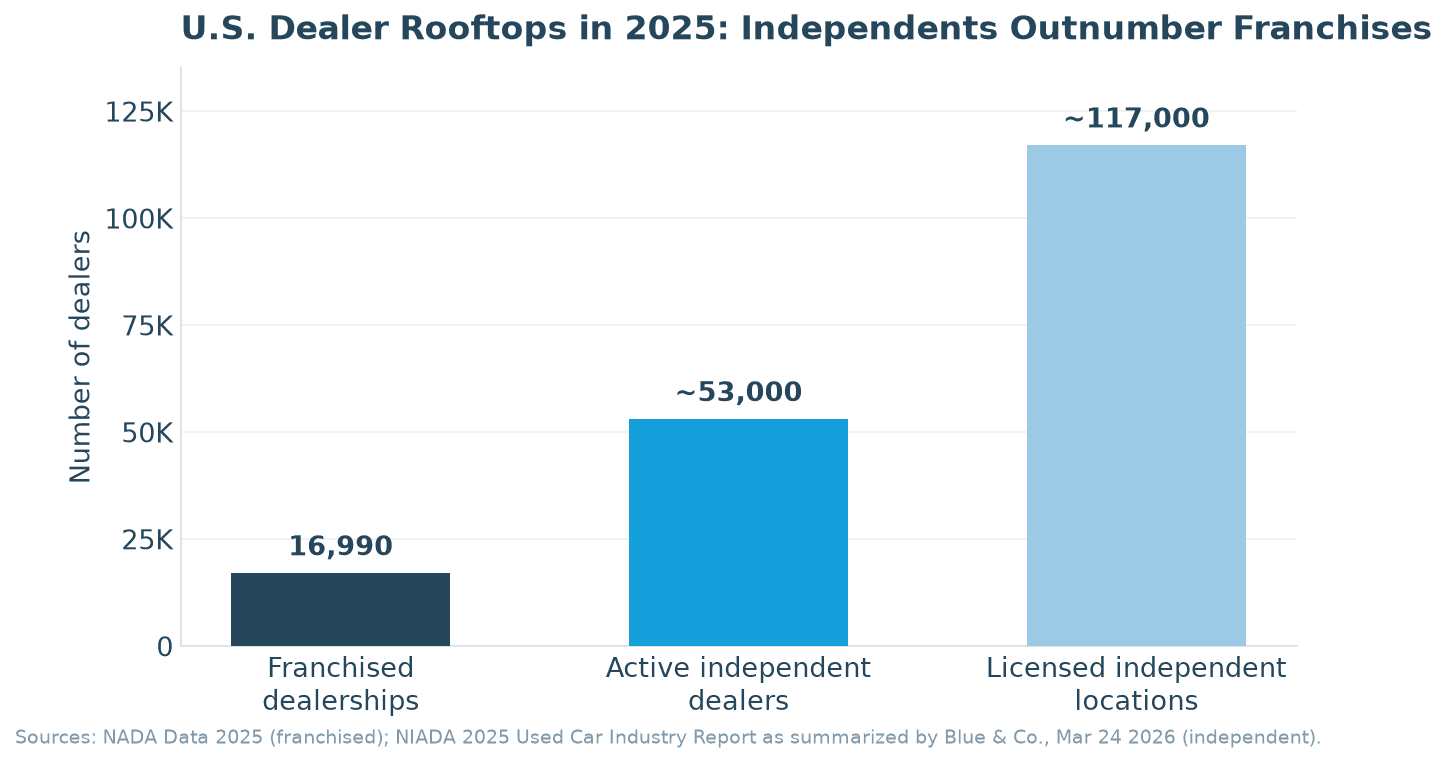
Most DMS software was designed for franchised new-car stores, a smaller market than it looks. NADA counts 16,990 franchised light-vehicle dealers in the United States for 2025. NIADA's 2025 Used Car Industry Report, as summarized by the accounting firm Blue & Co., puts licensed independent dealer locations at nearly 117,000, roughly 53,000 of them active. Those independents retailed 9.8 million used vehicles in 2025, per NIADA.
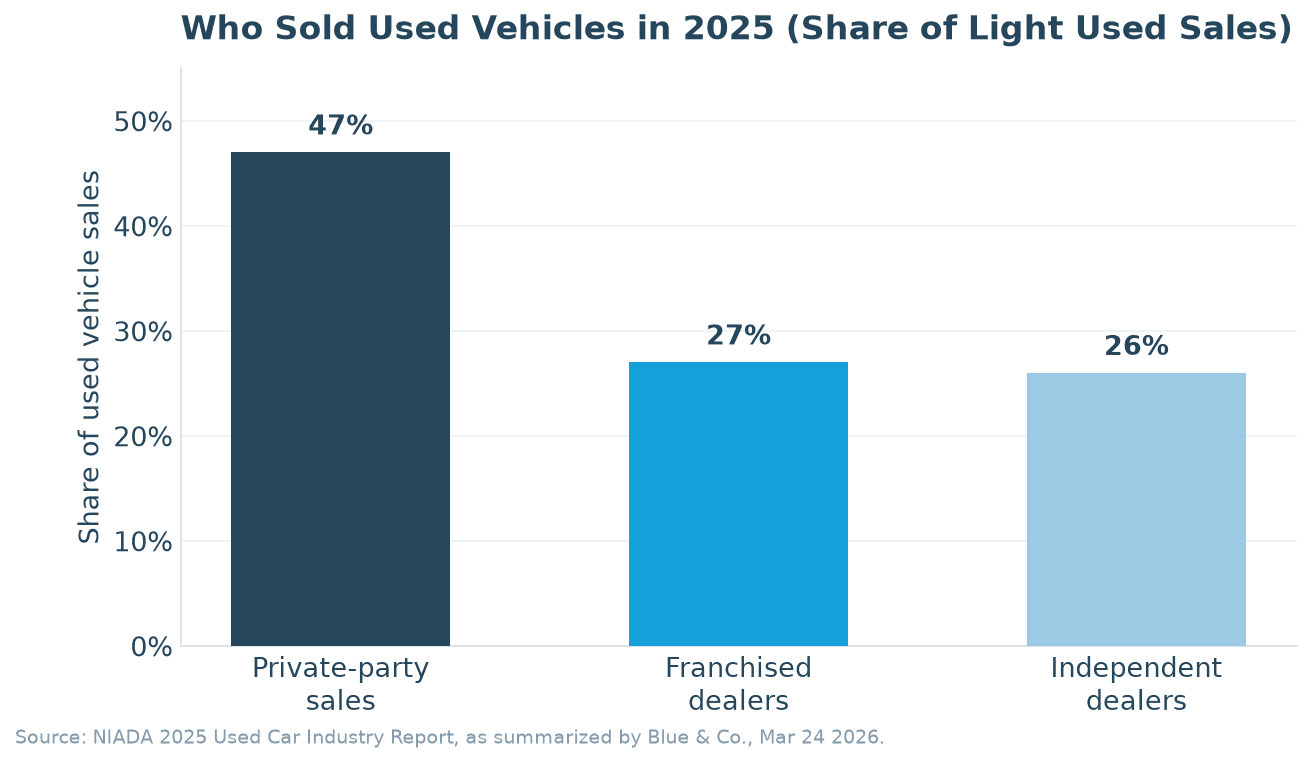
From the same report, Blue & Co. reports private-party sales at 47 percent of light used vehicle sales in 2025, franchised dealers at 27 percent and independent dealers at 26 percent.
A franchise-oriented DMS assumes a factory parts and warranty feed, a service department and an office big enough to absorb a long implementation. An independent or BHPH dealer needs different defaults:
- Wholesale and cash deals as normal deal types, not an afterthought behind the retail-financed path.
- BHPH built in: loan origination, payment scheduling, an online payment portal and collections, without a separate lending system.
- State forms filled from the deal, because most independents have no compliance department to check them by hand.
- QuickBooks, not a proprietary ledger, because that is what the outside accountant already uses.
- Setup in days, with a CRM and website from the same vendor, so the store is not paying three companies to keep one customer record in sync.
How dealer management system pricing works
Dealers searching for dealer management system pricing want one number, and vendors rarely publish one, because the price depends on packaging. The structure is similar everywhere, so compare quotes on the same basis:
- Per-rooftop subscription. A monthly fee per location, sometimes with user tiers.
- Modules. Desking and forms are usually in the base; accounting, BHPH, titling, credit bureau access and reporting may be add-ons.
- Setup and data migration. A one-time charge to move inventory, customers and open deals. Some vendors include it, some bill for it.
- Contract length. Longer terms lower the monthly rate and raise the cost of leaving. Ask who owns your data on the way out.
- Pass-through fees. Credit pulls, e-contracting, temp tags and some lender submissions are billed per transaction by third parties.
Get My Auto quotes the DMS per dealer. Our pricing page says it plainly: the price is customized to the store's size, sales volume and the modules you choose, so the fastest way to get a number is to request a DMS demo; we price it against your current setup on that call. The one price we publish is the CRM and Ava package, $695 per month after a 60-day free trial.
How to evaluate a DMS
A demo shows the vendor's best deal on its best day. Bring your own and watch the system handle your store's messy cases:
- 1Desk one of your real deals from last month, trade and doc fee included, and compare the payment to the contract you signed.
- 2Print your state's retail installment contract and buyer's order from that deal and check every field.
- 3Submit a test deal to one of your lenders and see how the response comes back.
- 4Run inventory aging and sales-by-lender reports. If either needs an export, note it.
- 5If you do BHPH, take a payment and check the customer balance and the delinquency report.
- 6Post a deal to QuickBooks and open the journal entry with your bookkeeper on the call.
Then ask what a demo does not show: who moves your data and what it costs, which state forms are included and who updates them, which bureaus, lenders and DMV services connect directly, whether the CRM is the same database, and how you export your data if you leave.
The migration risk is small if the vendor imports your inventory, customers and open deals before go-live, you run both systems for a short overlap, and the vendor confirms in writing what comes over and what does not.
How Get My Auto fits
Get My Auto's DMS for auto dealers is a cloud dealer management system for independent and BHPH stores, built on the AutoXplorer engine, acquired in 2022 and in use at dealerships for more than two decades. The product page organizes it into six modules: Intelligent Deal Desk, Forms & Contracts, Credit Bureau & Compliance, Lender Integrations, Titling & Temp Tags, and Accounting & QuickBooks. The deal desk handles Retail Cash, Retail Financed, Wholesale and BHPH deals on one worksheet, forms fill from the deal record, and transactions transfer to QuickBooks automatically. BHPH dealers get a BHPH & In-House Financing module with a MyPayment Portal for customers and a Collections Module that sends payment reminders by email and text, plus Real-Time Reporting & Analytics with scheduled delivery.
The DMS shares one data layer with the Get My Auto CRM, the dealer website and Ava, the AI assistant that answers leads and books appointments, so the customer a salesperson texted on Tuesday is the record the desk manager structures on Thursday, no connector in between. The next step is to request a demo. To start with the front end, the CRM and Ava come with a 60-day free trial.
Frequently asked questions
Topics
Share this article
Help others discover this content
Continue Reading
View All
Integrating CRM with Inventory Management

The Importance of Switching to Cloud-Based DMS for Auto Dealers

Get My Auto Launches DMS+: A State- of-the-Art Solution for Independent Dealerships